My Thoughts on AI, Part 2: Agent Setup, Workflow, and Tools
This is a post in the Thoughts on AI series.
Introduction 🔗︎
Hopefully you've already read Part 1: Fears, Opinions, and Mental Journey so you understand how I ended up with this mindset and approach. Or maybe you saw how long it was and just immediately bailed out :) Welcome either way.
Part 1 was the braindump. Story, thoughts, feelings.
Here's the part that probably more of you are interested in :) What my actual agent setup and dev workflow looks like. How I approach using AI for writing code, what tools I use, how I have them configured.
You can see a cleaned-up version of my config at https://github.com/markerikson/opencode-config-example - follow along in that repo for the pieces as I describe them here.
As I said in Part 1: I am not trying to sell anything, change anyone's mind, or say I am an expert. I don't have the answers.
BUT I DO HAVE SOME OPINIONS NOW! :) I'm not saying that everybody should follow them, but this is where I've landed.
- Introduction
- Agent Setup Overview
- Daily Development Workflow
- OpenCode Config
- Dev Plans Repo and Management Scripts
AGENTS.md- Commands and Skills
- Config Improvement Process
- Final Thoughts
Agent Setup Overview 🔗︎
Agent: OpenCode and CodeNomad 🔗︎
I've settled on OpenCode as my agent of choice.
I quickly decided I couldn't use TUIs for any development work. I've always been a GUI / IDE user anyway. I briefly tried both Claude Code and OpenCode TUIs, and bounced off hard. It's not that I am against terminals or CLI tools, I use a lot of them! But I also like having multiple tabs, my choice of coding font, syntax highlighting, and even just straightforward copy/paste abilities. Maybe I gave up too quickly, but I really struggled to get any of the TUIs to do that.
I know Claude Code is the market leader for coding agent. Maybe if I gave it another shot I'd find some use out of it.
On the other hand, I've always been enough of a tinkerer that I do customize my tech and tool setups. Yeah, I'm a lifelong Windows user, but I've got a comprehensive suite of tools and techniques and customizations I've built up over the years. I use Android because I want to fiddle and customize and configure the system the way I want it.
OpenCode fit that bill when I tried it. It works well for me, and I'm happy with it.
So if I'm not using the TUI, what's the alternative?
I found a great third-party OpenCode web UI called CodeNomad. Tried it, loved it, works great.
My personal laptop is all Windows, but my day job is WSL within Windows. I can start CodeNomad's server from within the WSL environment, browse to the web UI from the Windows side, and not have to deal with any cross-platform filesystem limitations.
I can have multiple sessions open in one browser tab (with a tabbed UI inside of the page), or have multiple browser tabs talking to the same server. I get full GUI copy and paste, good tool and edit/diff views, and a lot more.
So, I now am actually doing my primary development there in CodeNomad. Not an IDE.
Model: Opus 4.6 🔗︎
We primarily use Anthropic models at work. Honestly I've never even tried Gemini / Codex / GPT-whatever / Kimi / etc. I've really only used Opus and Sonnet.
Opus 4.5 and 4.6 have both produced great results for me. Sonnet is decent.
There's probably a lot I'm missing. I don't want to burn a lot of time trying out models and running evals every few days, or switching back and forth just to eke out another 1% gainzzz. That's fine.
I just need something that works well enough for me and that I'm comfortable with, and Opus 4.5/4.6 have fit that bill perfectly.
(As of writing, I haven't tried out 4.7, and I'm kinda scared to. Too many weird reports about its behavior.)
Also worth noting that I'm using via API, not Max plans.
IDE / VCS: VS Code and Fork 🔗︎
I've been using VS Code as my editor and IDE of choice for many years. It's not perfect, but it works.
Ironically, I now use it more as a file and diff viewer than as an editor :) I mean, I am writing this blog post itself in VS Code. But for daily dev work, I do the session driving in CodeNomad in the browser, and then I flip over to VS Code to review and commit the diff.
Honestly I don't like VS Code's Git panels and UI! They feel very awkward. The diff hunk staging view in particular is bad, especially compared to other IDEs like WebStorm or purpose-built Git GUIs. (Think I saw they maybe made some improvements in the last couple VSC releases - I haven't updated lately.)
Fork has been my Git GUI client of choice for the last few years. Excellent, absolutely worth it.
The issue here is that all my work repos are inside the WSL environment. It's technically possible to point Fork at a cross-platform WSL share of the repo folder, but the file changes tend to not refresh well, so I've mostly fallen back to just doing Git diff operations in VS Code. I think there may be some Fork tweaks that make it work better in WSL - haven't dug into those. I do know there's some Linux-native Git GUIs out there, I just haven't spent time evaluating those lately either.
Daily Development Workflow 🔗︎
My workflow is:
- A long-running "Orchestrator"-mode parent session with the overall context for the major development work that I'm doing. This session's job is solely to spawn child subtasks where I do the real work interactively.
- Child subtasks dedicated to some subset of the actual work. This may be codebase research and exploration, feature planning, or actual code development. These are highly interactive - I spend all my time discussing, directing, and driving these subtasks.
The core principles here are: I'm in control. I'm the one who knows what I'm working on and what I want to accomplish. I decide what the tasks are, and how to accomplish them. I decide when to move from research to implementation, when to keep digging further or pivot a session from the original goal to a side quest, and when a task is actually done. I need to be mentally engaged, understand what is happening and why, review the code, and actually commit it when I'm satisfied.
Most of the time I have one active parent session, and 1-3 active subtask sessions. I do bounce between the active subtasks and context-switch. Normally these are all still part of the same actual workstream. I have tried running sessions for 2-3 different workstreams at the same time, and it's tough, so I mostly stick with one workstream at a time now.
I'm sure a lot of folks will say "but that's so slow, you could be moving so much faster!".
I know. That's the point :) I'm intentionally choosing to limit the workflow to what I can manage in my own head, so that I am still fully mentally engaged and building my own understanding of the system.
I also specifically aim to keep as many of the moving pieces as deterministic and scripted as possible, especially for things that can be automated like file management tasks.
Parent Orchestrator Session for Project Management 🔗︎
I start every new parent session by running my /context command. This tells the agent to read current-focus.md and the last 2-3 days worth of progress file entries. That way it has baseline knowledge of the current repo, recent work, and what I'm actually working on.
From there, I give specific instructions for whatever I'm working on. This is usually several paragraphs of "here's the overall goal I'm working towards today, here's what I'm specifically trying to accomplish, here's how I want to get there". Then I specifically instruct the orchestrator parent session to spawn one or more subtasks to do the actual work. It then sits and waits for those to complete.
OpenCode subtasks are essentially async functions with a return value, where the subtask can return some message to the parent. However, the child often returns a response with the initial result, but I then keep driving the subtask much further and do a lot more work, so the initial response doesn't capture the actual work accomplished. Another problem is that if I don't like what a subtask is doing and hit the "Stop" button in that session, it cancels the response to the parent and returns an empty value. The orchestrator has a bad habit of seeing that empty response and saying "oh, the child didn't complete, let me spawn another subtask to pick up where it left off". I've had to specifically instruct it "never spawn more subtasks until explicitly told to do so!"
My instructions for spawning a subtask are surprisingly lax in some ways. I've done a bunch of work to give the orchestrator context on what I'm doing, why, and what the next goal is. At that point, I often say "spawn a new subtask to....", and leave most of the details up to the orchestrator. Sometimes I'll give fairly specific bullet points: "have the child read files A, B, and C for context. Then, come up with an initial plan to build this feature, and pause. I'll review and confirm implementation." Other times, especially when the parent session has gone on for a while and the orchestrator has already spun up a half dozen child tasks for earlier steps, I might just say "yep, kick off phase 3", but by that point I have high confidence that we're on the right track and there's an established pattern for what we're doing.
I've had some parent sessions last up to a couple weeks as I'm focused on an ongoing effort. Other times it might be a fresh parent session each day. Either way, it's about the overall goal that I'm working towards right now.
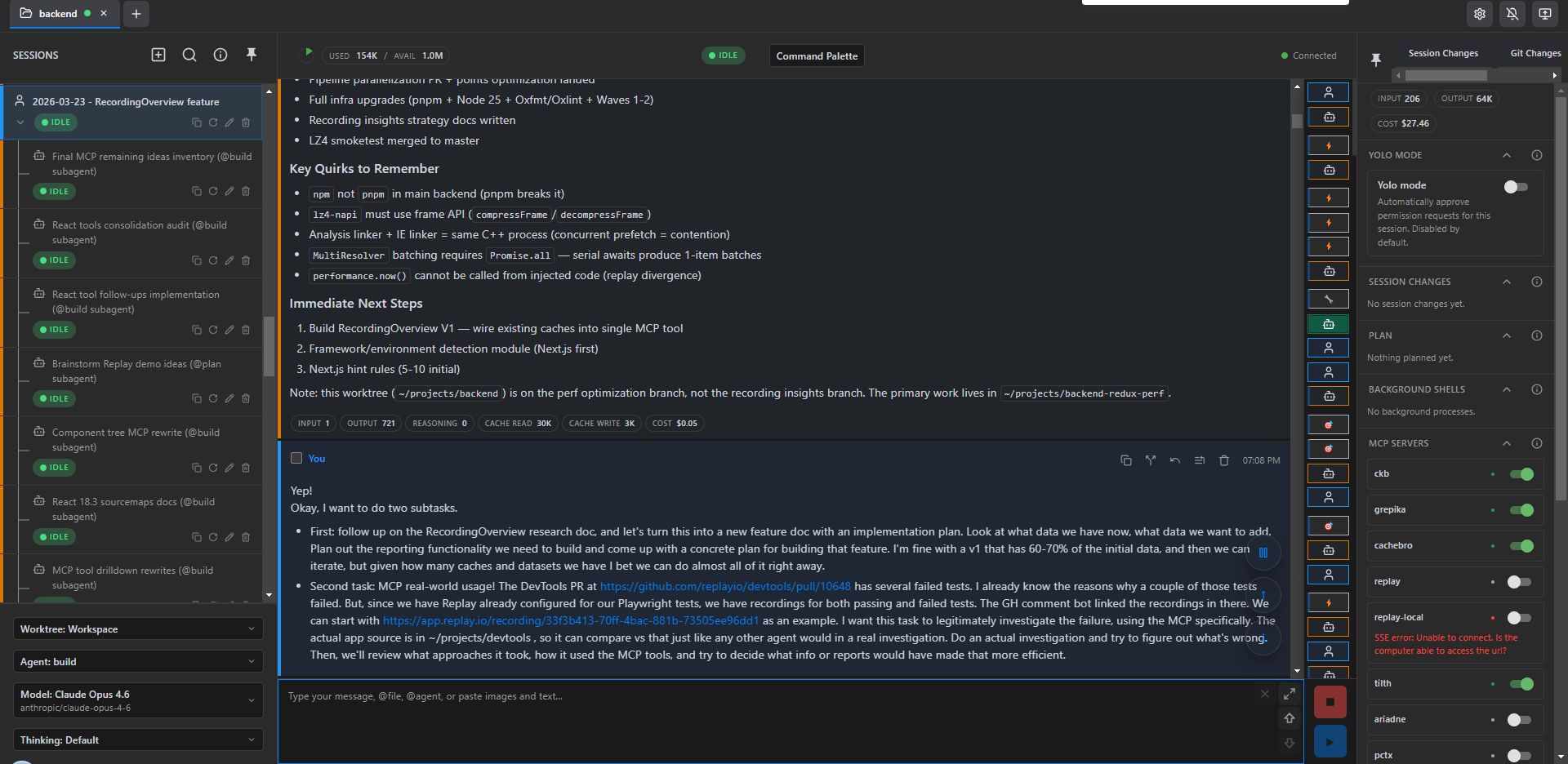
Here's what a typical orchestrator session looks like - the tail end of the /context being loaded, and my initial instructions for what I want to do in this session.
Subtasks for Development 🔗︎
Subtasks are where I do all the actual work.
I let the orchestrator write up the full prompt for child subtasks. This is normally enough to get the task started, read a bunch of files, orient itself, and "get the full picture" :)
The entire subtask session from there is highly interactive. If it's a research or planning session, I review the results and provide feedback on the output. If it's a coding session, I look at the initial plan for the changes and provide specific guidance and direction. I want to be very sure both me and the agent understand what we're trying to do, why, and how. I'll provide guidance on specific techniques to use, ask questions about edge cases and ideas, have it expand my own thinking as much as possible. I only tell it "okay, go make these changes" once I'm very sure about the intent.
I usually try to keep an eye on the agent as it's making edits. I don't want to have to explicitly approve operations as it's running (and we'll talk about permissions management more later), but I at least want a sense of what it's doing and if it looks like it's heading in the right direction. If not, I'll mash the "Stop" button and course-correct.
Once the edits are done, I'll run / test / etc as needed. I also try to review the code as much as possible. I then do the actual Git commits myself - staging, messages, commits.
In a lot of ways this is "one developer workflow, but with extra steps". Fair :) The speedup comes from the agent's ability to do the research for me, expand "here's what I want to do" into a plan for how to do it, and then turn the "what and how" plan into specific code edits faster than I can. My fingers are fast, but my brain always had to work through the intent first. Here, I get to focus more on the intent and the desired behavior, and let the AI define most of the code-level changes to accomplish that.
I frequently drive subtasks for extended periods of time. I try to keep a given subtask on track, but sometimes I end up veering into side quests because it's easier to keep going here rather than start up a whole new subtask and load context for the freshly discovered problem all over again. Early on, this definitely led to hitting session context limits, which forced me to create commands to reload an entire session's transcript and run those after the entire session got auto-compacted. Now that I have the OpenCode Dynamic Context Plugin and better tools and instructions for reading files, it's rare for even an extended session to end up over 100K context. The agent is very proactive about compressing recent tool calls and discussions in order to keep context manageable, and this seems to produce much better results than a big-bang "summarize the entire session so far" compaction. (Granted, sometimes it over-compresses recent chunks of the discussion and gets a bit confused on what we were doing :) )
Once I am actually ready to wrap up a given subtask, I specifically manually trigger the two record keeping commands. /progress tells the subtask to append a new "what did we accomplish?" entry to today's progress log file. /subtask-complete writes a standalone version of that update with more details, suitable for the parent orchestrator session to read. I then switch back to the parent session and run /subtask-resume, which reads all outstanding subtask handoff files so it knows what the N most recent subtasks accomplished. There's some duplication here, but I view it as /progress is for the permanent record of what I did today, /subtask-complete is the function return call results for the subtask to ensure the parent session knows where things stand.
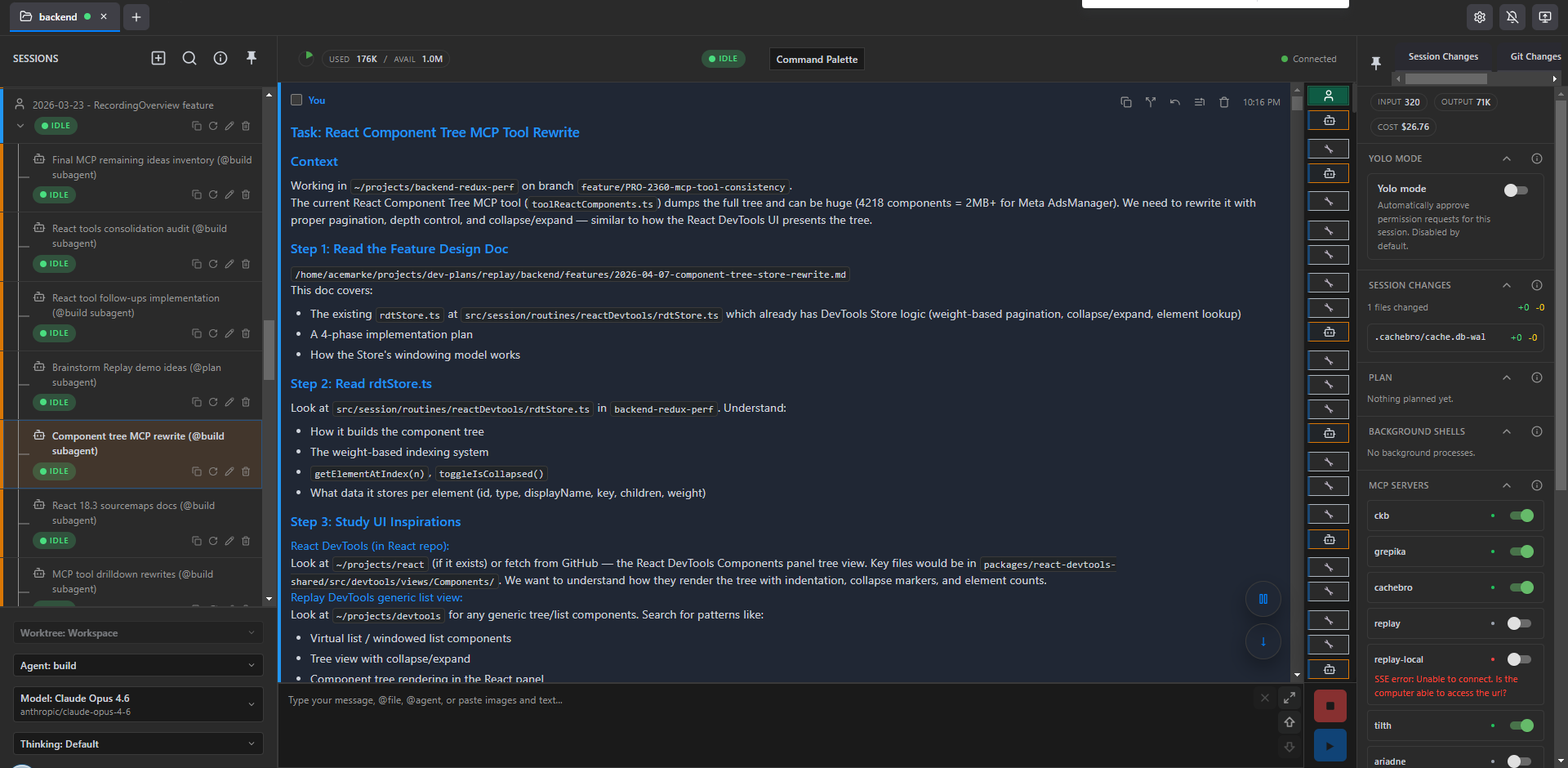
Here's a typical child subtask, in this case for working on Replay MCP's ReactComponent MCP tool. First, the initial orchestrator-provided prompt:
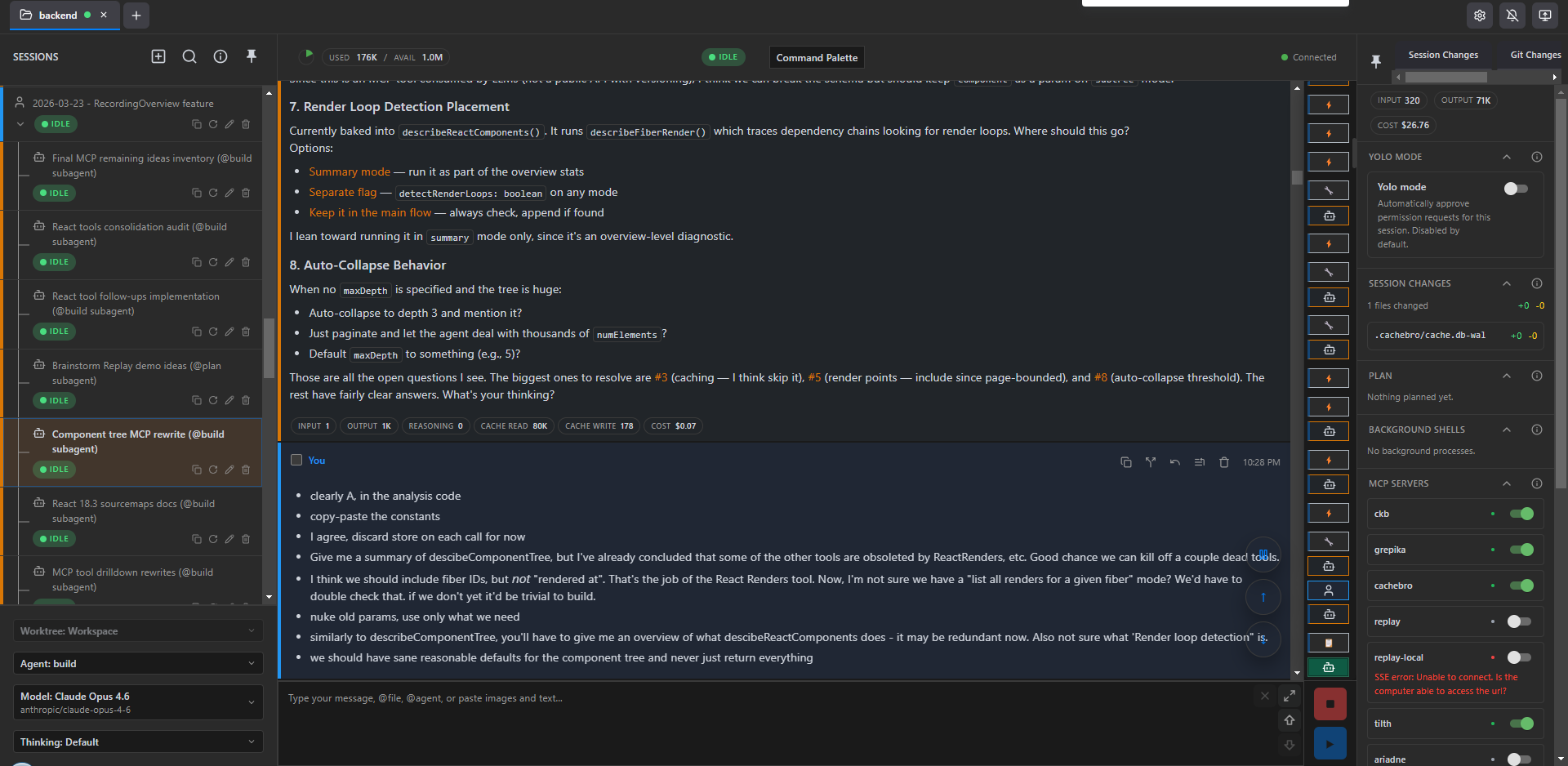
Then my responses to some of the agent's analysis and implementation suggestions:
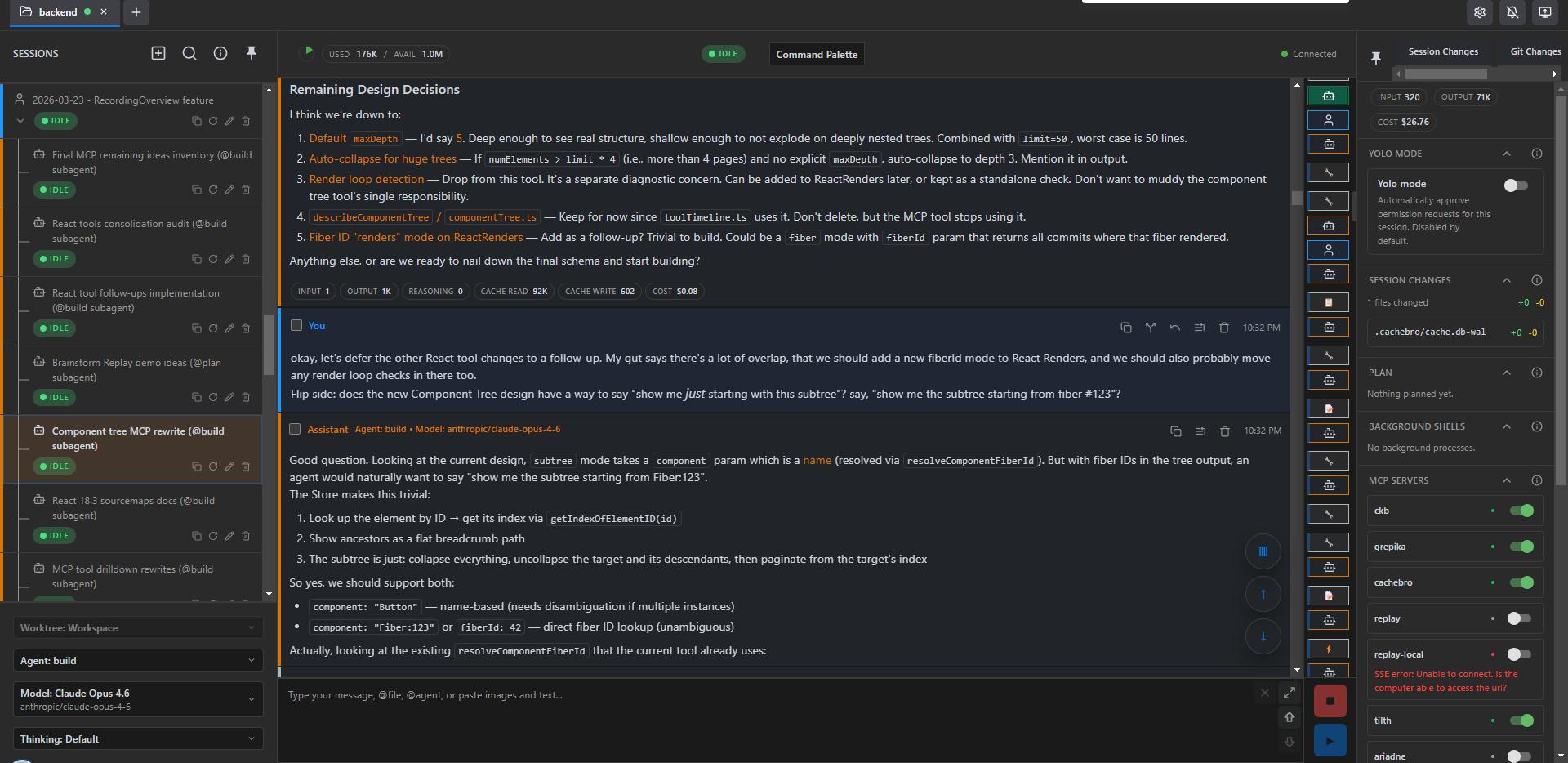
and finally nailing down some design decisions:
OpenCode Config 🔗︎
I have a very customized OpenCode config and setup that I've built to directly support that workflow.
Permissions Management 🔗︎
I don't YOLO or --dangerously-skip-permissions.
I run my agents directly on my own machines, no sandboxing. That also means that I need some amount of safety checks on commands that get run.
I do want to eliminate as many unnecessary permissions prompts as I can. Even if I'm watching and directly driving an agent session, it does get very annoying to see a bunch of permission prompts in the chat session blocking and waiting for my approval, when they're pretty clearly harmless.
So, as I said in Part 1: determinism.
I generated a custom OpenCode plugin to auto-approve as many Bash commands as reasonable based on the contents. It's decently sophisticated. There's a very long regex-based list of known safe commands and subcommands that get auto-approved, as well as a similar of known dangerous commands that will get blocked. It actually does Bash parsing and tries to deal with heredocs and command substitutions.
The bigger question is how this actually works with OpenCode at all.
OpenCode refactored their whole permissions and plugin system a few months ago. There was already a "permission.ask" event trigger that allowed plugins to actually return a result, but in the refactor that got disabled. I filed an issue, other people have filed PRs, those haven't been merged. So, I've been maintaining a small local fork of OpenCode that reimplements that functionality. That allows my plugin to actually manage permissions.
I saw Claude Code now has a "not quite YOLO but let the agent self-approve commands" mode. That's nice, but why rely on more agent calls and more tokens when you can just parse and manage the commands deterministically? :)
The big loophole here is dynamic scripts - bun -e, node -e, python3 -c. Agents love those. They're really useful! Don't even bother writing a script file to /tmp, just bun -e "someCodeHere()" and get the results. Really useful when introspecting some data files.
Obviously this means the agent could trivially smuggle through code that starts nuking folders or uploading my secrets to the mothership.
In practice: I'm not sure I've seen my agents actually try to run a command that would be truly destructive. I've got these guardrails in place, and to some extent I haven't seen evidence that they're necessary.
The permissions plugin does try to do some additional scanning of inline eval scripts for blatantly obvious calls like unlink() and flags those entire commands for approval.
It's a tradeoff I'm happy with at this point.
File Reads 🔗︎
OpenCode has a Read tool, same as every other harness. It works. But agents default to just reading massive amounts of file text, over and over, both to learn the codebase and to remind themselves of what they've seen already.
I found a file read caching tool called cachebro that is available as an MCP. It checks file access times and hashes, and if the file hasn't changed since the last read, the tool returns a message saying "this hasn't changed".
I've told my agent to default to using cachebro for file reads. Unfortunately, the cachebro MCP read tool doesn't interact with OpenCode's own "file last read" logic. That meant that if my agent tried to write to a file, OpenCode would return an error saying "you must use the Read tool first", and then it would have to actually call Read and it's all a waste of time and tool calls and tokens.
So since I was already maintaining a small running fork of OpenCode to handle the "permission.ask" event, I just added another commit to the fork that exposed OpenCode's "file access time" calls into the Plugin interface. Then I built my own cachebro plugin that watches for cachebro MCP tool calls, and gets/sets the file read times so OpenCode knows that file's been read. Works great.
Code Structure and Search 🔗︎
Per above, agents default to just Read for everything. This is awful for codebase exploration. Read 10-15 files just to trace dependencies and imports. Lots of extra wasted code text bloating the context. Don't do this!
I've tried out a half-dozen different MCP tools that do full codebase parsing and provide tools to query structure, dependencies, outlines, and relevant chunks of code.
Currently, I use grepika and tilth via MCP, and get great results. Highly recommended. I again have my AGENTS.md with instructions to always use those as the primary file reading options, and I consistently see my agent using them and intelligently only loading relevant parts of files.
I've also previously tried ckb (CodeKnowledgeBase). It's got a massive set of tools for querying structure and blast radius, and I've wanted to use it, but I've run into a few problems with indexing not working or tool calls timing out. Been playing with ariadne, and I'm constantly keeping an eye out for other codebase indexing tools.
Context Management 🔗︎
Per above, I do all my work exclusively in subagent sessions that I drive myself. This means my parent orchestrator session doesn't have any issues with maxing out the context window and needing to compact, but the child tasks do.
I did pretty frequently hit 160-170K context and run into auto-compaction. I hated it. The auto-compact summaries were adequate, but inevitably there'd be a bunch of details I cared about that would get lost.
At first I built some dev scripts commands that would read the OpenCode session JSON files, filter out tool calls, and export the meaningful message contents out as a complete Markdown file. I built a /session-reload command and skill that would force the agent to run the export command, read the entire exported transcript, and then pause.
However, grepika really reduced the amount of code that was bloating context. That helped.
Then I found the OpenCode Dynamic Context Pruning Plugin. Instead of waiting until your session is almost at full context and then doing a big summary of the entire session as a replacement, which would be really lossy, it gives your agent a compress tool that it can use at will to compress and summarize chunks of your session (like a bunch of exploration file reads, or earlier messages as you switch focus to a follow-up effort). This means there's more of the session messages that stay exactly as-is, there's less time spent compacting, and it's much rarer that one of my subtask sessions actually nears max context and has to compact everything just to reset.
Ironically, I really found a great working combo of tools right before Anthropic shipped 1.0M context windows by default for everyone :) But seriously, in the last couple months since landing on this combo of tools and plugins, I find that even a very long-running technical subtask session rarely gets above 100K context, thanks to grepika and cachebro minimizing file reads and the agent happily compressing earlier chunks on the fly.
I know this does mean you might have some cache invalidations that could bump cost because it's no longer just the one latest message at the end of the session that hasn't been seen by the server. But on the flip side, keeping the actual total context size smaller seems to pay off, and it's not like the agent is calling compress every other turn.
I was using the rtk Rust CLI tool to automatically compress the output of tools like grep to save on tokens. Unfortunately I saw too many cases where the agent got stuck in a loop trying to call grep, rtk grep would change the output too much, the agent got confused and tried again, and it just wasted time and tokens. So, eventually disabled rtk. Might come back to it at some point.
Session History and Search 🔗︎
As mentioned, I initially built some custom scripts that would find the right session JSON files and export as separate Markdown transcripts with just the message text, no tool contents.
OpenCode 1.2 switched to storing sessions internally in SQLite. I held off upgrading to 1.2 for a while because I had all my custom scripts and commands and didn't want to take the time to rewrite them. But, I finally did, and that actually simplified things quite a bit.
My previous /session-reload command told the agent "run the export session-type command, look at the list of most recent sessions it gives you, find what you think is the right Markdown file based on your own context and instructions, and read that". Kind of awkward, left room for error.
After rewriting my own session history plugin to read from OpenCode's own plugin/internal client.session object, that all went away. Instead, I have a reload_session tool that can just directly grab the list of messages from the plugin API using the session ID, filter, construct the Markdown contents, and directly return it as the tool call result. No file path or "match up the session" steps needed.
It was also trivial to throw together search_sessions and read_session tools. They're currently pretty dumb and just do basic regex searches on session contents, no vector DBs or similarity scores or anything. But they're pretty useful even in that form.
Dev Plans Repo and Management Scripts 🔗︎
Plan Management Issues 🔗︎
During my initial couple months of using KiloCode, I found myself with the same proliferation of Markdown plan files that we've all run into. So where do those go? The agent wants to default to writing them to the root of whatever repo you're working in. I made an effort to redirect it to write them to a ./docs folder, although in our main backend repo that already existed so I had to resort to ./docs/merikson.
Some of these plan files were worth committing or preserving, even if just for my own reference later. Others weren't.
So where do the plan files go if this is a shared repo? I really didn't want to pollute a shared repo and commit history with dozens of my own personal semi-ephemeral plan files, or even the maybe-more-widely-useful architectural writeups.
Personal Dev Plans Repo 🔗︎
I decided the best option was to set up an entirely separate personal development doc knowledge base repo, just for myself. I dubbed it dev-plans. That would give me a consistent place that I could store all my own Markdown artifacts and knowledge, commit it, save those for future reference, and not pollute the shared actual repo Git history.
My dev-plans repo structure is:
/dev-plans
  /personal
  /redux
    /$PROJECT1
      /architecture
      /features
      /progress-updates
      /research
      /subtask-handoffs
      current-focus.md
      QUIRKS.md
  /replay
current-focus.md is intermittently updated whenever I feel I'm significantly shifting gears or focus on a repo, or completed a major chunk of work and the "what I'm working on now" section should reflect that.
QUIRKS.md is more of a project structure, known actual quirks or patterns, things to remember document.
Every file other than the two fixed current-focus.md and QUIRKS.md files starts with a YYYY-MM-DD prefix, such as features/2026-05-06-some-feature.md.
I've got some archival scripts set up to move older documents from the flat folder structure into a nested YYYY/MM structure to keep things a bit more readable, but haven't done much with that yet. I suspect I'll need some tools to help index the documents when I do that.
Workflow Artifacts 🔗︎
architectureis meant to be longer-lived explorations of the codebase structure and patterns. Full-blown "what do we know about this project", vertical "trace through this feature or data flow path", reference materialfeaturesis WIP development plans. Here's the next thing we're going to build, we've turned this into a concrete plan, use this as the basisresearchis more of a grab bag. Sometimes it's scanning the codebase for concepts, other times it's research dives through Github and NPM for relevant conceptsprogress-updatesis the daily dated appended progress entries,subtask-handoffsis the individual handoff files that get automatically archived as soon as they're read
devplans.ts Automation Script 🔗︎
I've settled on using Bun with TS scripts for a lot of my personal needs and utilities.
I've tried to automate a lot of the common tasks I saw consistently pop up when interacting with the dev-plans repo. I created ~/.config/opencode/scripts/devplans.ts and have fleshed it out over time with a variety of commands the agent uses all the time.
Currently, that provides:
/**
 * devplans.ts - Unified dev-plans CLI helper
 *
 * Commands:
 *   devplans info                      Get project mapping info (no side effects)
 *   devplans progress                  Get/create today's progress file (with late-night date logic)
 *   devplans progress list [n]         List n most recent progress files (default 3)
 *   devplans progress append [file]    Append entry from JSON file (deleted after read) or stdin
 *   devplans handoff create [slug]     Get path for new handoff file
 *   devplans handoff list              List files in pending/
 *   devplans handoff move [file]       Move from pending/ to completed/YYYY/MM/DD/
 *   devplans handoff consume           List, read, and move all pending handoffs
 *   devplans doc create <type> <slug>  Create dated doc (type: feature|arch|analysis|issue)
 *   devplans doc list <type> [n]       List docs of type (default 10)
 *   devplans session extract           Extract recent sessions, list newest 10
 *   devplans archive <folder>          Archive old files to folder/archive/YYYY/MM/DD/
 *   devplans archive --all             Archive all doc folders
 */
These deterministic commands save a lot of steps that the agent would have had to run itself to figure out what dev-plans folder path matches the current repo, creating placeholder handoff files or documents, and updating progress docs. Most of my OpenCode slash commands start with some variation of "Run `bun dev-plans.ts some-command".
I also have a JSON file with folder mappings for my usual repo checkout paths in my personal laptop Windows and work laptop WSL environments. That way the script can just read those mappings and use the known paths.
Per the Workflow section, I have a /init command that helps me set up the scaffolding when adding a new project to dev-plans.
Progress Updates and Subtask Handoffs 🔗︎
The most used subcommands are for progress and handoff.
My original /progress command told the agent to actually read today's progress file completely, then append a new section. This became an O(n^2)-type problem as the progress file kept growing over the course of a day. Just reading the file would bloat context, and this was especially bad when the subtask was already bordering on max session context.
Now, devplans progress prints JSON output with today's progress file path, but also creates a placeholder temp file and provides that path as well. The agent is instructed to overwrite the placeholder with its actual update, and then runs devplans progress $TEMPFILE. The script then deterministically appends the new section to today's progress doc so the agent didn't have to read that file itself.
Similarly, /subtask-complete in the child tells it to run devplans handoff create creates a target file path that the agent can write to, and then when I run /subtask-resume in the orchestrator parent it runs devplans handoff consume which auto-prints all pending handoff files immediately and then auto-archives them. This saves multiple steps of the agent fumbling around.
The devplans commands also intelligently handle dates and timestamps - automatically generating file paths with timestamps, figuring out today's progress file, and even assuming that any updates between midnight and 6 AM really belong on "the previous day's progress file" because it's likely I was working late into the night on something.
There's still a lot of manual trigger behavior in here, and again I'm good with that :)
AGENTS.md 🔗︎
My AGENTS.md file is currently about 250 lines (and writing this post forced me to review it and do some reorganizing and condensation - it had gotten rather crufty).
It starts with a short personal overview: who I am, day job at Replay, OSS work on Redux.
Major sections include:
- Interaction patterns: I specifically instruct the agent to be keep its responses short and direct, and avoid sycophancy. That includes both descriptions, and acknowledging my instructions.
- Thinking and problem solving: use critical thinking and be skeptical about assumptions and correctness; stop and rethink problems if stuck; do research, not trial-and-error; state plans and wait for confirmation to check assumptions and confirm user intent
- Git: never commit, always stop and wait for me to review changes
- Personal tool environment: personal vs work laptop setups, path management, use Bun for scripting not Python
- Coding standards: TS usage, running tests, minimizing comments
- Code navigation: minimize context loading at all times; use
grepikaandtilthfor navigating code,cachebrofor other file reads - Tasks and behavior: manage todos and progress; be careful counting completion; manage current context
- Dev plans workflow: use
devplans.tsfor file management; use ofQUIRKS.mdand other rules files - Subtask spawning and workflow rules: only spawn subtasks when told; verify completion;
I make no claims that my AGENTS.md is optimized, correct, or a model to follow :) It's just what I've evolved through my own usage.
Commands and Skills 🔗︎
Project Setup 🔗︎
I have some commands and skills for initial dev-plans setup for a new repo - the usual /init and /architecture-type commands that scan the codebase, do a writeup of the details, do some initial architecture description docs, etc. Don't do those often, nothing special there.
Progress and Subtask Management 🔗︎
As described above: /progress specifically instructs the current session to create a new entry in today's progress log. /subtask-complete tells a child subtask to record a separate handoff file that can be used as a "return value" to update the parent orchestrator session, /subtask-resume has the parent session read all outstanding handoff files to know what got done.
Task Tracking 🔗︎
For most of my day to day work development, I've gotten along fine without any explicit external task tracker. I'm the one who knows what I'm working on.
For a couple projects, I've tried using dex as a lightweight external nested task tracking CLI. (Think beads, but with way less slop.) It's worked pretty well! I've got a skill that instructs the agent how to use dex efficiently. I'd have the orchestrator session run dex commands to see where we stand in terms of task status, then pass dex task IDs to a subtask and tell it to mark that task as in progress. Similar to avoiding having the agent do any Git commits, I told it not to mark any dex tasks as complete until I explicitly instructed it to do so, and have a /dex-complete command to help with that.
Other Commands 🔗︎
/session-reload extracts the entire message history of the current session and returns it. Per above, this used to be writing it all to disk as a Markdown file, now it just constructs the transcript in memory from the DB entries and returns it as the tool result. I use this much less frequently now thanks to the OC Dynamic Context plugin and use of better file search tools - now that I have those I rarely get close to 150K+ context even in a long running subtask session.
I wrote my own AI-powered code review tool called diffloupe that tries to compare stated change intent vs inferred change intent, and reviews for both bugs and intent mismatches. I have a /code-review command that tells the agent to review the current changes by triggering diffloupe and then report on the results.
Other Skills 🔗︎
I do have a variety of skills available:
- several for frontend design and UI work
- advanced TS patterns
- Replay CLI and MCP usage
- Architecture design and feature planning
- File / codebase search tools
- Assorted skills explaining how to use
diffloupe,dex, andgh
Config Improvement Process 🔗︎
After I did my initial config and workflow development efforts back in December, I've alternated between periods of leaving it exactly as-is and focusing on just doing work, and getting annoyed with parts of the workflow and making improvements. Generally it's noticing that some particular pain point is becoming an issue - that I keep having to repeat a particular set of instructions, or that part of the workflow could be automated via devplans.ts, or trying out a different codebase indexing plugin that I found. At that point I'll go spin up a new session inside my OpenCode config repo itself, talk through the problem space, and develop the changes accordingly.
As a relevant example, just reading AGENTS.md to write this post showed me how the content had gotten somewhat bloated and disorganized. So, I just started up a new session to review it, described my pain points, and the agent suggested a slimmed-down version that retained the key points, moved some of the detailed file tool usage instructions out to a separate skill, and better organized the "how to communicate" and "daily workflow" sections. Done.
Potential Future Workflow Improvements 🔗︎
I'm pretty happy with the tooling and workflow that I've got right now. The one area where I feel I'm lacking right now is that longer-term memory and context. The system I've got is great for "what is the repo we're working in?" and "what's the current set of tasks?", but I'm finding I have to do a lot of work to dig up other recent sessions where some decision was made or a research document was generated, and feed those back into the current session. I need something that helps index or scan generated planning and progress files and dynamically feeds in relevant results to the current session, or MCP tools that the session can use to scan already-indexed files.
I also don't have any kind of automatic "scan recent sessions for common patterns or corrections or learnings, and extract workflow improvements" system. I do instruct agents to include possible learnings in the progress and handoff artifacts, and sometimes those trickle over to updates to QUIRKS.md, but I feel there'd be value in the automatic review process.
I am very happy with grepika and tilth for codebase exploration over just reading files manually. I can imagine it would be nice to somehow preload more of the codebase into a given session so it doesn't have to re-explore some of the same files each time
Code review and ensuring intent are still hard. diffloupe has been useful for doing some review checks. I intended to add my own full code review UI to it, but got distracted and never got back to that. I've bookmarked a bunch of other code review tools and may still investigate some of those.
Final Thoughts 🔗︎
6000+ words, and this was with me deliberately avoiding going into full amounts of technical detail :) So there you go.
See the example config repo for the actual commands, scripts, and setup.
No idea how many people will end up going through here, but as always, hope this info was useful!
And more than anything else: whether you use AI to write all your code or write it by hand, I hope that you can find a workflow for yourself that is sustainable, maintainable, understandable, and safely productive.
This is a post in the Thoughts on AI series. Other posts in this series:
- May 07, 2026 - My Thoughts on AI, Part 2: Agent Setup, Workflow, and Tools
- May 07, 2026 - My Thoughts on AI, Part 1: Fears, Opinions, and Mental Journey